
Showing posts with label Malware. Show all posts
Showing posts with label Malware. Show all posts
Task Manager has been disabled

Dial a Fix (DAF) is fantastic nifty software. It was developed by DjLizard. The software helps you fixing some Windows problem gleaned info from MS Knowledgebase and other forums. It did helped me to fix some problem of my client's PCs and Laptops especially when their task manager is locked. Have you ever seen this - when you press Ctrl+Alt+DEL, the task manager won't show? it says "Task Manager has been disabled by your administrator" and in fact, you're logon is administrator mode. DAF will fix this in a single click, plus, it can do other useful fixes like Windows Installer, Window Update, SSL/HTTPS/Cryptography and Registration Center.

I have gleaned info of how to unlock the task manager on the Internet, and I found some other utilities that do about the same job. Task Manager Fix is another great freeware utility that could save your day.

Also, you can do this - click Start -> run -> type "regedit" press Enter. Search for
HKEY_CURRENT_USER\Software\Microsoft\Windows\CurrentVersion\Policies\System
look for DisableTaskMgr, delete it. Close the regedit window.
What is Autorun.inf?
Labels:
Malware,
Troubleshooting
Autorun.inf is a small configuration text file that runs when you insert flashdrive or CD/DVDROM into computer. Initially, it is used to automate CD software installation or presentation. The automation was good but hackers saw the potential to run malicious program into victim's computer. Autorun file is always stored in the root of media. If you browse the media, you will see the file autorun.inf. However, hacker will hide this program. If you want to check whether autorun.inf file is inside your flashdrive, you can do a few things:
- First, open Windows Explorer. Check the drive of your media (Flashdrive, CDROM).
- Click Start button -> run -> type "cmd" (without qoute) and press Enter.
- You will see Command line console. Now type "X:" (without qoute) and press Enter (assume X is your drive)
- Type "dir" (without quote) press Enter. Now, it lists all files on the drive. Do you see "autorun.inf"?
- If you can't see, it might be hidden. Now to see if it's there, type "dir /ah" (without quote) press Enter.

- This time it will show you the hidden files. "/ah" is attribute hidden.
- If autorun.inf is exist, you can unhide it by typing this command "attrib -h -r -s autorun.inf" (without quote) press Enter. This command tells you to -h (minus/remove hide), -r (remove readonly), and -s (remove system).
- The file shows up.

Why I use "-s" and "-r" in my attrib parameter? You can't delete system file. Hacker will set autorun.inf attribute to system. That's the reason we remove the system attribute.
or
Open Windows Explorer, Tools menu, Folder Options. From there choose View and choose Show hidden files and folders.
You will unhide the autorun.inf.
This technique will inform you the existence of the virus/malware by reading command in autorun.inf.
Warning: Do not double click inf file. It will run or install program behind our back. Open notepad (click start -> run -> type "notepad", then open autorun.inf from there) or if your command line console is running, type "notepad autorun.inf" press Enter.
This is the basic content of autorun.inf
[autorun]open=setup.exeicon=icon.ico
When user inserts the media into computer, it will open/run setup.exe. Icon.ico is the icon of your media.
Now, hacker will write autorun.inf like this:
(hacker named YaHaa)
[autorun]shellexecute=wscript.exe autoupdate.dll.vbsThis command will execute VBScript that contain malicious script.This is part of the script (autoupdate.dll.vbs)'VB Worm v1 By YaHaaon error resume nextdim mysource,winpath,flashdrive,fs,mf,atr,tf,rg,nt,check,sdatr = "[autorun]"&vbcrlf&"shellexecute=wscript.exe autoupdate.dll.vbs"set fs = createobject("Scripting.FileSystemObject")set mf = fs.getfile(Wscript.ScriptFullname)dim text,sizesize = mf.sizecheck = mf.drive.drivetypeset text=mf.openastextstream(1,-2)do while not text.atendofstreammysource=mysource&text.readlinemysource=mysource & vbcrlfloopdoSet winpath = fs.getspecialfolder(0)set tf = fs.getfile(winpath & "\autoupdate.dll.vbs")tf.attributes = 32.....
How to get rid of the malware. If it already in the system you can install a good antivirus like Avira. You can download it from www.free-av.com. Another good anti spyware that you can install is the Ad-Aware. You can download from www.lavasoft.com/products/ad_aware_free.php
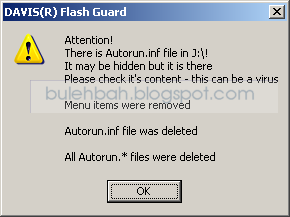
One program dedicated to guard your flashdrive is called FlashGuard. It is developed by Davis Software and you can download it here http://www.davisr.com/cgi-bin/content/downloads.htm. This nifty software saves my laptop from malicious program that use autorun.inf. It removes the autorun.inf before it acts.
Subscribe to:
Posts (Atom)


